Skip to Content
Go back

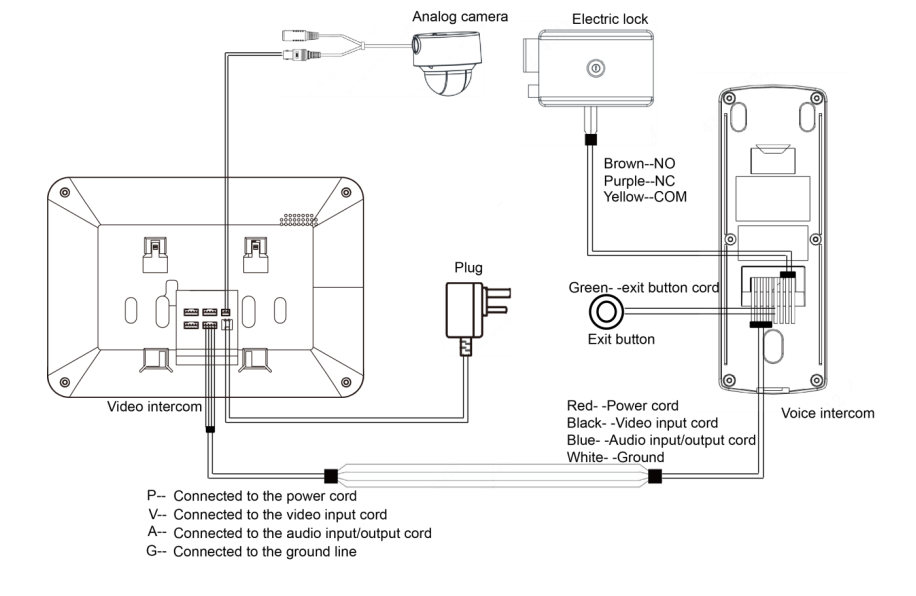
4-Wire Intercom Wiring Diagram
4-Wire Intercom Wiring Diagram

A 4-wire intercom wiring diagram typically consists of the following components:

  1. Power Supply (P): This wire provides power to the 2 way intercom system.
  2. Video (V): This wire is responsible for transmitting video signals between the master station and sub-stations (if the intercom system includes video capabilities).
  3. Audio (A): This wire is responsible for transmitting audio signals between the master station and sub-stations.
  4. Ground (G): This wire serves as the common ground for the entire intercom system.

Here is a basic wiring diagram to follow for a 4-wire intercom system using P, V, A, and G wires:

  1. Connect the Power Supply (P) wire from the power source to the master station’s P terminal.
  2. Connect the Video (V) wire from the master station’s V terminal to the V terminal of each sub-station (if the intercom system has video capabilities).
  3. Connect the Audio (A) wire from the master station’s A terminal to the A terminal of each sub-station.
  4. Connect the Ground (G) wire from the power source to the master station’s G terminal, and from the master station’s G terminal to the G terminal of each sub-station.

Comparing 4 Wire Intercoms with IP
When comparing a 4-wire intercom system with an IP-based intercom system, there are several limitations to consider:

  1. Scalability: IP-based intercom systems are more scalable than 4-wire systems. Adding new devices to an IP system is generally easier, as they only need to be connected to the existing network infrastructure. In contrast, expanding a 4-wire system may require running additional cables and connecting them to the master station, which can be more complex and time-consuming.
  2. Flexibility: IP-based intercom systems offer greater flexibility in terms of installation and integration with other systems. They can be easily integrated with existing IP networks, allowing for seamless communication between intercom devices and other networked devices such as IP cameras, access control systems, and building automation systems. In contrast, 4-wire intercom systems may have limited compatibility with other systems and may require additional hardware to achieve similar levels of integration.
  3. Remote access and control: IP intercom systems can be easily accessed and controlled remotely via the internet, allowing users to manage their intercom system from anywhere with an internet connection. This feature is not typically available in 4-wire intercom systems.
  4. Audio and video quality: IP-based intercom systems can offer superior audio and video quality compared to 4-wire systems, particularly when using high-quality codecs for audio and video compression. This can result in clearer communication and better overall performance.
  5. Maintenance and troubleshooting: IP-based intercom systems are generally easier to maintain and troubleshoot compared to 4-wire systems. Network diagnostic tools can be used to identify and resolve issues remotely, whereas 4-wire systems may require on-site inspections and hands-on troubleshooting.
  6. System upgrades: Upgrading an IP-based intercom system is often more straightforward than upgrading a 4-wire system. Software updates can be applied remotely, and hardware upgrades can be easily integrated into the existing network infrastructure.
See also  Access Control Vestibules: Types and Peculiarities

Video Door Phones

Despite these limitations, 4-wire intercom systems may still be suitable for certain applications, particularly in situations where a standalone intercom system is desired, or where the existing infrastructure does not support an IP-based system. It is important to carefully consider the specific needs and requirements of each installation when choosing between a 4-wire and IP-based intercom system.

Let’s discuss this article on Twitter and Telegram. Join our channels!

similar articles
Articles

You ordered groceries or a parcel, but there is no one at the door to open it? A modern IP intercom solves this without “handing a key to a neighbour”. The scenario is simple: the courier rings the intercom, you receive the call on your phone, see the person on video, talk to them, remotely […]

Articles

Hartman Controls is an Access Control company focused on integrated platforms for modern buildings. Its flagship platform, Odyssey, is built around access control while integrating intercom communication, video management, cameras, and mobile interaction into a single, cohesive ecosystem. Odyssey includes: Centralized access control platform for managing credentials, doors, elevators and permissions Modern Management interface via […]

Articles

The modern intercom industry represents a unique combination of electrical engineering, security systems, and information technology. For more than a century, this sector has evolved from simple acoustic tubes to complex cloud ecosystems integrated with artificial intelligence. By 2025, the global market for intercom devices is valued at USD 33.4 billion, with projected growth to […]

Articles

BAS-IP is pleased to announce the successful confirmation of compatibility between BAS-IP video intercom entrance panels and Zennio Z-series touch panels. This integration unites professional IP intercom technology with advanced KNX-based touch interfaces, delivering a seamless and reliable communication experience for residential and commercial projects. Confirmed Functionality Compatibility has been rigorously tested and verified across […]

Articles

BAS-IP is pleased to announce the successful integration of its advanced intercom and call communication platform with ButterflyMX devices. This collaboration delivers enhanced flexibility and convenience for both residential and commercial properties. This integration enables ButterflyMX entry panels—equipped with SIP calling support—to connect seamlessly with the BAS-IP SP-03 hands-free audio intercom. As a result, users […]

Articles

In most projects, door entry is only thought about at the level of schematics and specifications. On the drawings, neat symbols appear; in the schedule you see the model, quantity and a line that simply says “grey/black”. Then a high-end residential complex or office with a carefully designed interior is built for serious money, and […]

Articles

An IP video intercom is a “who’s at the door” system that runs over a regular computer network and the internet. You see the visitor on a monitor in your flat/house/office or in an app on your phone, talk to them, and open the door if needed. The key difference from traditional 2-wire or 4-wire […]

Articles

We are committed to strong and innovative data protection practices, so that every client can trust that their personal data is processed safely and securely. BAS-IP DISTRIBUTION LTD (Company or BAS-IP) has prepared this memorandum for our clients regarding our compliance with applicable data protection legislation, including the UK General Data Protection Regulation (UK GDPR) […]

Articles

BAS-IP confirms full compatibility of its card readers with ICT access cards. This integration enables seamless and reliable operation, supporting both UID reading and encrypted data reading modes, with data transmission via the Wiegand interface. Details We are pleased to announce that BAS-IP card readers have successfully passed compatibility testing with ICT access cards and […]

Articles

Seamless Integration: How Accrete Technology Enhanced Their Smart Community App with BAS-IP Mobile Link SDK In today’s rapidly evolving smart living landscape, seamless integration between platforms is a necessity rather than a luxury. A recent collaboration between BAS-IP and Accrete Technology showcases how a powerful SDK can enable advanced intercom functionality within an already robust […]