
4-Wire Intercom Wiring Diagram
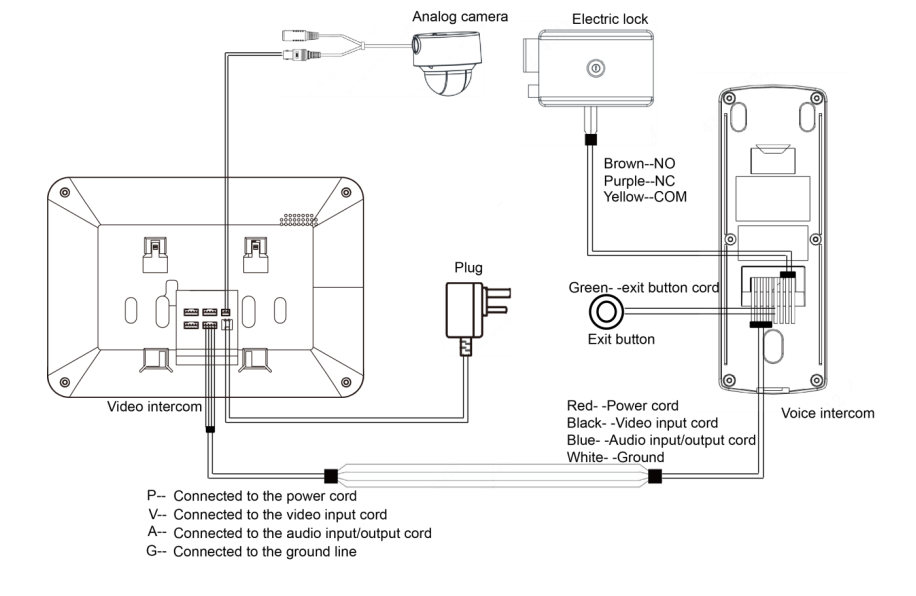
A 4-wire intercom wiring diagram typically consists of the following components:
- Power Supply (P): This wire provides power to the 2 way intercom system.
- Video (V): This wire is responsible for transmitting video signals between the master station and sub-stations (if the intercom system includes video capabilities).
- Audio (A): This wire is responsible for transmitting audio signals between the master station and sub-stations.
- Ground (G): This wire serves as the common ground for the entire intercom system.
Here is a basic wiring diagram to follow for a 4-wire intercom system using P, V, A, and G wires:
- Connect the Power Supply (P) wire from the power source to the master station’s P terminal.
- Connect the Video (V) wire from the master station’s V terminal to the V terminal of each sub-station (if the intercom system has video capabilities).
- Connect the Audio (A) wire from the master station’s A terminal to the A terminal of each sub-station.
- Connect the Ground (G) wire from the power source to the master station’s G terminal, and from the master station’s G terminal to the G terminal of each sub-station.
Comparing 4 Wire Intercoms with IP

When comparing a 4-wire intercom system with an IP-based intercom system, there are several limitations to consider:
- Scalability: IP-based intercom systems are more scalable than 4-wire systems. Adding new devices to an IP system is generally easier, as they only need to be connected to the existing network infrastructure. In contrast, expanding a 4-wire system may require running additional cables and connecting them to the master station, which can be more complex and time-consuming.
- Flexibility: IP-based intercom systems offer greater flexibility in terms of installation and integration with other systems. They can be easily integrated with existing IP networks, allowing for seamless communication between intercom devices and other networked devices such as IP cameras, access control systems, and building automation systems. In contrast, 4-wire intercom systems may have limited compatibility with other systems and may require additional hardware to achieve similar levels of integration.
- Remote access and control: IP intercom systems can be easily accessed and controlled remotely via the internet, allowing users to manage their intercom system from anywhere with an internet connection. This feature is not typically available in 4-wire intercom systems.
- Audio and video quality: IP-based intercom systems can offer superior audio and video quality compared to 4-wire systems, particularly when using high-quality codecs for audio and video compression. This can result in clearer communication and better overall performance.
- Maintenance and troubleshooting: IP-based intercom systems are generally easier to maintain and troubleshoot compared to 4-wire systems. Network diagnostic tools can be used to identify and resolve issues remotely, whereas 4-wire systems may require on-site inspections and hands-on troubleshooting.
- System upgrades: Upgrading an IP-based intercom system is often more straightforward than upgrading a 4-wire system. Software updates can be applied remotely, and hardware upgrades can be easily integrated into the existing network infrastructure.
Indoor Stations





Despite these limitations, 4-wire intercom systems may still be suitable for certain applications, particularly in situations where a standalone intercom system is desired, or where the existing infrastructure does not support an IP-based system. It is important to carefully consider the specific needs and requirements of each installation when choosing between a 4-wire and IP-based intercom system.
Let’s discuss this article on Twitter and Telegram. Join our channels!