
Skip to Content
Go back
reading time: 3 mins

Fermax Intercom System Comparison

What is Fermax?

Fermax door entry company was founded by Fernando Maestre back in 1949. Since its founding, the main office of Fermax and the main production is located in Spain.

All this time the company had specialized in intercom systems. Not to mention the very attractive design that Fermax did for its door stations and intercom monitors. This attractive design was made in beautiful packaging, that’s why it was very warmly welcomed by customers.

FERMAX has 7 subsidiaries in Belgium, China, France, Poland, UK, Singapore, and 4 representative offices in Colombia, Dubai, Portugal and Turkey.

Fermax Intercom Models

Monitors – VEO, Smile, Neo, Wit, Loft, iLoft
Entry Panels – Skyline, Cityline, Marine, Kin, Milo

Fermax IP Video Intercom – Meet

After Fermax ceased production of the Fermax Lynx IP intercom system, it was replaced by Fermax Meet. Fermax Meet intercom system is based on SIP protocol. It is Fermax Meet that we want to compare with our IP intercom system.

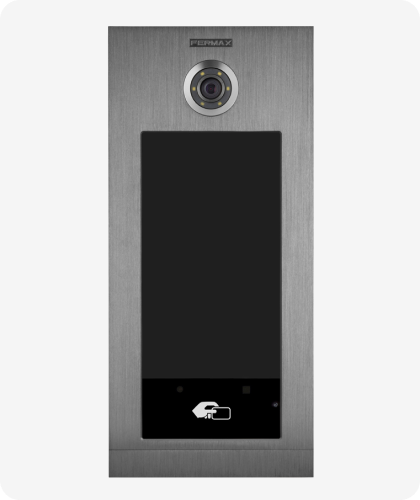
Fermax vs BAS-IP Comparison

Feature BAS-IP Fermax
Build-In Camera Yes, Up to 2MP
Access Control EM-Marin/MIFARE Classic, Plus, Desfire EV1, Ultralight/NFC/Bluetooth
Keyless Entry
Face Recognition
Virtual keys (PIN codes) for visitor access
QR codes for visitor access
Multifactor Autentification
Email Notification
Property management software integrations
Measuring Temperature
Cloud-based access management
Indoor Phones
Indoor Monitors 7 models
Android Based Monitors
3rd Party APP Support
Mobile APP
Elevator control
Connected IP Cameras Integration
Yes, 1,2 MP
MIFARE
Via External Module
Via External Module
Via External Module
Stand-alone
3 party SIP devices
3 models
YES (Special Request)
See also  Accessible entry for everyone: why BAS-IP AV-08FBIL is suitable for government and municipal projects
Looking for New Intercom System?
Disclaimer: The current comparison was made on June 20, 2022. The Comparison based on information we have available to us at the time of writing.

*BAS-IP supports Mifare Classic, Plus, Desfire EV1, Ultralight.

Fermax Intercom not Working

Sorry to hear that your Fermax intercom is not working. Here are a few steps you can follow to troubleshoot the issue:

  1. Check the power supply: Ensure that the intercom system is connected to a working power source. If it’s connected to a power outlet, try using a different outlet to confirm if the issue is with the power supply.

  2. Examine the wiring: Inspect the wiring for any visible signs of damage or disconnection. Loose or damaged wires can cause the intercom to malfunction. If you find any issues, you might need to contact a professional to fix them.

  3. Reset the system: Sometimes, a simple reset can resolve minor issues. Unplug the intercom system from the power source, wait for 30 seconds, and then plug it back in. Check if the issue persists.

  4. Check for interference: Electronic devices, such as Wi-Fi routers, cordless phones, or other intercom systems, can cause interference. If possible, try moving these devices away from your intercom system and see if it resolves the issue.

  5. Update the firmware: Some intercom issues can be resolved by updating the firmware. Refer to your Fermax intercom’s user manual or visit the Fermax website for instructions on how to update the firmware.

  6. Test individual components: If your intercom system has multiple components, like indoor and outdoor units, test each component separately to identify the faulty part. Replace or repair the faulty component as needed.

  7. Contact Fermax support: If none of the above steps resolve the issue, it’s best to contact Fermax support. They can provide further guidance or help you identify if the issue requires professional assistance.

See also  BAS-IP Hardware Exploring: Intercom Dimensions

Remember to always follow safety guidelines and consult your intercom system’s user manual for specific instructions and recommendations.

similar articles
Articles

The entry panel is the first point of contact between a building and a person. And if this building is municipal, social, medical, or educational, the panel at the entrance must be clear and convenient for everyone: the hard of hearing, the visually impaired, elderly people, visitors unfamiliar with the system. AV-08FBIL was designed precisely […]

Articles

A video intercom monitor is often treated as just a screen on the wall. In reality, it is one of the key parts of the system: it is the device through which the user receives the call, sees the visitor, speaks with them and manages access. What a Video Intercom Monitor Is A video intercom […]

Articles

When the word “SIP” appears in the specifications of an intercom or entry panel, it often sounds like something purely technical. In practice, the meaning is much more practical. SIP is a protocol used to establish communication between devices on a network. Put simply, it helps one system “call” another, establish a connection, and begin […]

Articles

When people first come across the term “IP video intercom,” it often sounds more technical than it really is. In practice, the basic idea is fairly simple. An IP video intercom is an intercom system that works over a network. In other words, communication between the entry panel, the indoor monitor, and other devices is […]

Articles

An entry panel is often treated as just “the button by the door.” In reality, it is one of the key elements of the intercom system. It is the device through which a call begins, audio and video are carried, and, in some cases, access, identification, and different entry scenarios are handled. So it is […]

Articles

Access control and a video intercom are often treated as though they were the same thing, because both are linked to entering a building. But they are not quite the same. A video intercom is primarily about communication with a visitor: the call, the conversation, the image, and the decision to release the door. Access […]

Articles

What PoE Means in Simple Terms PoE stands for Power over Ethernet. Put simply, it means that the same Ethernet cable can carry both data and power. That means that, for some devices, you do not need a separate network connection and a separate power feed. If the equipment supports PoE, one cable may be […]

Articles

Why This Comparison Is Often Presented Too Simplistically When people talk about the difference between an IP and an analog video intercom, the discussion is often reduced to a crude formula: analog is basic and outdated, while IP is automatically modern and better. That is a convenient story if someone only wants to sell IP […]

Articles

Start Not with the Design, but with the Use Scenario The most common mistake is choosing an entry panel without a clear task in mind. A panel for a private house, a block of flats, an office, or a commercial site is not the same thing. First, answer the basic questions: How many users will […]

Articles

What the Difference Actually Is A flush-mounted panel is recessed into the wall or into a prepared niche, so only the front face remains visible from the outside. That makes the installation look neater and more integrated. A surface-mounted panel is fixed on top of the wall. It protrudes further, but it is usually much […]