
Demystifying SIP Protocol: The Backbone of IP Communication Systems
In the age of seamless digital communication, the Session Initiation Protocol (SIP) has emerged as a critical component of IP intercom systems and other advanced communication technologies. This article delves into the origins of SIP, its advantages, distinguishing features, and how it has revolutionized the way we communicate. With clear examples, FAQs, and visual aids, you’ll gain a comprehensive understanding of SIP protocol and its real-world applications, including its use by BAS-IP intercom supplier.
Decoding SIP: Understanding the Session Initiation Protocol
The Session Initiation Protocol, or SIP, is a signaling protocol responsible for initiating, maintaining, modifying, and terminating real-time sessions involving multimedia elements like voice, video, and messaging services over IP networks. It is an essential component of most modern IP communication systems, including VoIP (Voice over IP) services and IP intercom systems.
The Birth of SIP: Who Created the SIP Protocol?
SIP was developed by the IETF (Internet Engineering Task Force) in the mid-1990s as a means to enhance communication over IP networks. It was primarily created by Henning Schulzrinne and Mark Handley, whose work laid the foundation for SIP’s standardization as RFC (Request for Comments) 2543 in 1999. Since then, SIP has undergone several revisions, with the latest being RFC 3261 in 2002.
SIP and VoIP: Drawing the Line
While SIP and VoIP are often used interchangeably, they are not the same. VoIP refers to a broader category of technologies and protocols that enable voice communication over IP networks. SIP, on the other hand, is a specific signaling protocol within the VoIP ecosystem, responsible for managing multimedia sessions. In essence, SIP is a critical component of VoIP systems, but it is not the sole technology involved in VoIP communication.
The Advantages of Adopting SIP
- Scalability: SIP allows for easy scalability, enabling businesses to expand or reduce their communication infrastructure as needed.
- Cost savings: SIP reduces the cost of long-distance and international calls, as well as the need for dedicated phone lines.
- Flexibility: SIP enables the integration of various communication channels, like voice, video, and messaging, through a single platform.
- Enhanced features: With SIP, businesses can access advanced communication features like call forwarding, video conferencing, and virtual numbers.
Key Features of SIP Protocol
- Session control: SIP is responsible for establishing, modifying, and terminating multimedia sessions.
- Addressing: SIP uses a simple, email-like addressing system (SIP URI) for easy identification and routing of calls.
- Mobility: SIP allows users to move seamlessly between different devices and networks without losing their communication sessions.
- Interoperability: SIP is compatible with various communication devices and platforms, ensuring seamless communication.
SIP Protocol in Action: How It Works
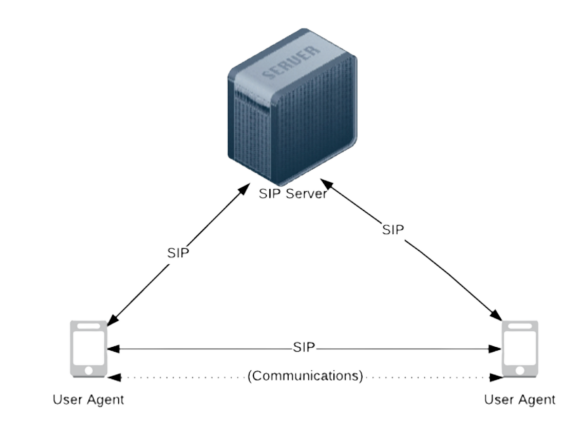
At its core, SIP is a text-based protocol that follows a request-response model. SIP clients send requests to a SIP server, which processes the request and sends a response back to the client. The main steps involved in a typical SIP session are:
- Session initiation: The caller sends an INVITE request to the callee, detailing the media types and codecs supported.
- Session negotiation: The callee responds with a provisional response (100 Trying), followed by a final response (200 OK) that includes their media capabilities.
- Session confirmation: The caller sends an ACK message to confirm receipt of the final response and establish the session.
- Media exchange: With the session established, the two parties can now exchange multimedia data using the agreed-upon media types and codecs.
- Session termination: Either party can terminate the session by sending a BYE request, to which the other party responds with a 200 OK message.
SIP Requests: Real-life Examples
- INVITE: Initiates a new session or modifies an existing one.
- ACK: Confirms the receipt of a final response to an INVITE request.
- BYE: Terminates an ongoing session.
- CANCEL: Cancels a pending INVITE request.
- OPTIONS: Queries the server for its capabilities and supported methods.
- REGISTER: Registers the client’s contact information with the SIP server for future communication.
Essential Elements of the SIP Network
- User Agent (UA): Represents the end-user devices in a SIP network, such as IP phones, smartphones, or softphones.
- Proxy Server: Routes SIP requests and responses between clients, handling tasks like load balancing and authentication.
- Registrar Server: Maintains a database of registered users and their contact information for future communication.
- Redirect Server: Provides alternative routing information to the client, allowing the client to contact the callee directly.
- Location Server: Stores and retrieves the location information of users, helping proxy servers route SIP messages.
SIP Protocol Use Cases: Making an Impact
- IP telephony: SIP forms the backbone of modern VoIP systems, enabling seamless voice communication over the internet.
- IP intercom systems: SIP is a vital component of SIP intercom systems like those provided by BAS-IP intercom supplier, allowing for efficient and secure access control and communication.
- Video conferencing: SIP enables real-time video communication and collaboration among multiple parties across various devices and platforms.
- Unified communications: SIP facilitates the integration of multiple communication channels, such as voice, video, messaging, and presence information, into a single platform.
FAQs
Conclusion
The SIP protocol has revolutionized the way we communicate, providing cost-effective, scalable, and flexible solutions for IP-based communication systems. As a crucial component of VoIP services and IP intercom systems like those offered by BAS-IP intercom supplier, SIP has proven to be an indispensable technology in the modern communication landscape. With a solid understanding of SIP’s history, benefits, features, and real-world applications, you can now appreciate its impact on the world of digital communication.