
Skip to Content
Go back

Improve Your Security with a Keyless Entry Lock Door Keypad: A Comprehensive Guide

In today’s fast-paced world, convenience and security go hand in hand. As technology continues to advance, keyless entry systems have become a popular choice for securing homes and businesses alike. The keyless entry lock door keypad provides an innovative solution to traditional lock-and-key methods, offering increased security, user-friendly features, and peace of mind. In this article, we’ll dive into the benefits of using a keyless entry lock door keypad and guide you through the process of how to use the keyless entry keypad.

Why Choose a Keyless Entry Lock Door Keypad?

The keyless entry lock door keypad provides several advantages over traditional locks, such as:

  • Enhanced Security: Keyless entry systems minimize the risk of unauthorized access, as they cannot be picked or bumped like traditional locks.
  • Customizable Access Codes: Multiple user codes can be programmed, allowing for controlled access to specific individuals.
  • No More Lost Keys: With keyless entry, you’ll never have to worry about misplacing keys or being locked out.
  • Easy to Install: Most keyless entry systems can be easily integrated into your existing door setup.

The BAS-IP UKEY Keyless Entry Solution

The BAS-IP UKEY is a cutting-edge keyless entry lock door keypad that provides secure, reliable access control for homes and businesses. It offers the following features:

  • Touchscreen Keypad: The intuitive touchscreen interface allows users to easily input access codes.
  • Multi-Factor Authentication: The UKEY system supports multiple authentication methods, including PIN codes, proximity cards, and biometrics.
  • Scalability: The UKEY system can be easily expanded to accommodate additional doors and users as needed.
  • Remote Management: Manage and monitor access from anywhere using a smartphone or web interface.
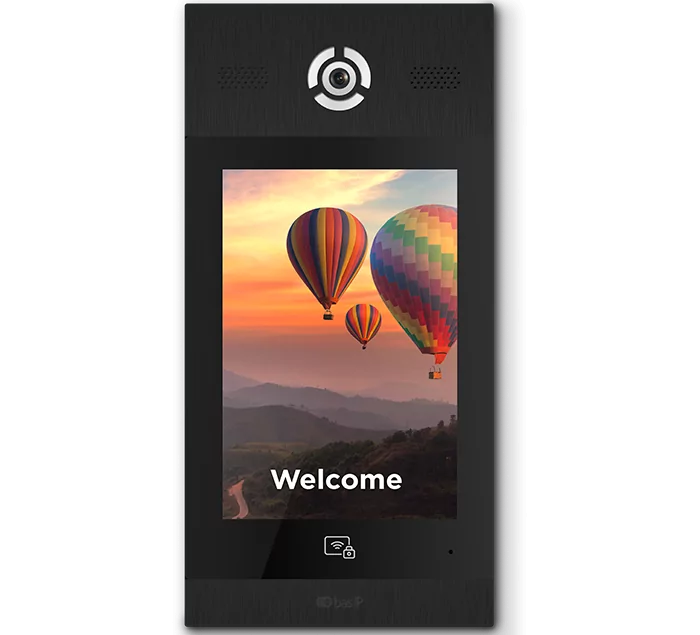
See also  How an IP Video Intercom Differs from an Analogue One
BAS-IP Door Panel with Touch Keypad and Keyless Entry Option

How to Use the Keyless Entry Keypad

To ensure a seamless experience, follow these steps to set up and use your keyless entry lock door keypad:

  1. Installation: Consult the user manual for detailed instructions on installing your keyless entry system. It is typically a straightforward process involving the removal of your existing lock and installation of the new keypad and lock components.
  2. Program Access Codes: Set up unique access codes for each user. This can typically be done through the keypad itself or a connected app or web interface.
  3. Test the Keypad: Ensure the keypad functions correctly by testing each access code. Input the code, and confirm that the door unlocks as expected.
  4. Monitor Access: Utilize the remote management features to monitor access events and make any necessary adjustments to user permissions.
  5. Regular Maintenance: Keep the keypad clean and free from debris.

FAQs

Q: Can I use the keyless entry lock door keypad on any door?

Yes, most keyless entry systems are designed to be compatible with various door types, including wooden, metal, and glass doors.

Q: How do I reset the access codes if I forget them?

Consult your system’s user manual for instructions on resetting access codes. Some systems may require a master code or a factory reset to regain access.

Q: Can I still use a traditional key with a keyless entry lock door keypad?

Depending on the model, some keyless entry systems include a key override option, allowing you to use a traditional key if necessary.

similar articles
Articles

The entry panel is the first point of contact between a building and a person. And if this building is municipal, social, medical, or educational, the panel at the entrance must be clear and convenient for everyone: the hard of hearing, the visually impaired, elderly people, visitors unfamiliar with the system. AV-08FBIL was designed precisely […]

Articles

A video intercom monitor is often treated as just a screen on the wall. In reality, it is one of the key parts of the system: it is the device through which the user receives the call, sees the visitor, speaks with them and manages access. What a Video Intercom Monitor Is A video intercom […]

Articles

When the word “SIP” appears in the specifications of an intercom or entry panel, it often sounds like something purely technical. In practice, the meaning is much more practical. SIP is a protocol used to establish communication between devices on a network. Put simply, it helps one system “call” another, establish a connection, and begin […]

Articles

When people first come across the term “IP video intercom,” it often sounds more technical than it really is. In practice, the basic idea is fairly simple. An IP video intercom is an intercom system that works over a network. In other words, communication between the entry panel, the indoor monitor, and other devices is […]

Articles

An entry panel is often treated as just “the button by the door.” In reality, it is one of the key elements of the intercom system. It is the device through which a call begins, audio and video are carried, and, in some cases, access, identification, and different entry scenarios are handled. So it is […]

Articles

Access control and a video intercom are often treated as though they were the same thing, because both are linked to entering a building. But they are not quite the same. A video intercom is primarily about communication with a visitor: the call, the conversation, the image, and the decision to release the door. Access […]

Articles

What PoE Means in Simple Terms PoE stands for Power over Ethernet. Put simply, it means that the same Ethernet cable can carry both data and power. That means that, for some devices, you do not need a separate network connection and a separate power feed. If the equipment supports PoE, one cable may be […]

Articles

Why This Comparison Is Often Presented Too Simplistically When people talk about the difference between an IP and an analog video intercom, the discussion is often reduced to a crude formula: analog is basic and outdated, while IP is automatically modern and better. That is a convenient story if someone only wants to sell IP […]

Articles

Start Not with the Design, but with the Use Scenario The most common mistake is choosing an entry panel without a clear task in mind. A panel for a private house, a block of flats, an office, or a commercial site is not the same thing. First, answer the basic questions: How many users will […]

Articles

What the Difference Actually Is A flush-mounted panel is recessed into the wall or into a prepared niche, so only the front face remains visible from the outside. That makes the installation look neater and more integrated. A surface-mounted panel is fixed on top of the wall. It protrudes further, but it is usually much […]