
Skip to Content
Go back
reading time: 3 mins

Comelit Intercom System

Like BPT, Comelit Group is an Italian manufacturer of intercom systems. Comelit intercoms are distinguished first and foremost by their innovative approach and technology. The company motto “Passion. Technology. Design” is the best reflection of both the company and its products.

Comelit gained popularity thanks to its two-wire system (Comelit SimpleBus), which does not require a special cable and works over quiet long distances. After the intercom market began to move towards IP in the 2000s, Comelit quickly offers its customers a full IP system, which was named Comelit VIP (not luxury but Video Internet Protocol).

Unlike most IP systems on the market, Comelit VIP uses its own closed protocol. Thanks to it, the transmission speed of a single video stream is only 350 kbit / sec, compared to the usual 3 – 4 Mbit / sec in SIP. But this solution has a disadvantage – no other manufacturer on the intercom system Comelit will not work, and you are dependent on one manufacturer.

The Comelit VIP system can be integrated into the company’s own smart home, called Comelit SimpleHome. In principle, it covers most customer needs. However, it is not as flexible as KNX, Crestron or Control4, with which BAS-IP integrates perfectly.

Comelit Intercom Troubleshooting

If you’re having trouble with your Comelit intercom system (Comelit intercom not ringing), there could be a few possible issues. Here are some basic steps to help you troubleshoot the problem:

  1. Power Issues: First, check to make sure the intercom system is getting power. Is the power light on? Are there any error messages showing on the screen? If not, try unplugging the intercom and plugging it back in.
  2. Wiring Issues: If the intercom system has been recently installed or if there was a recent power outage, it’s possible that there could be a problem with the wiring. Check to make sure all wires are properly connected and there is no visible damage to any of the wires.
  3. Volume Control: If you’re having trouble hearing through the intercom, it could be a volume issue. Check to make sure the volume is turned up on both the sending and receiving units.
  4. Interference: Interference from other devices can cause problems with the intercom’s signal. Try turning off other devices to see if that helps.
  5. Reset the System: If you’re still having trouble, it may be helpful to reset the system. This can often resolve minor technical issues.
  6. Check the Manual: The Comelit intercom manual may have specific troubleshooting steps for your model. If you don’t have the manual, you can usually find a digital version online by searching for your model number.
  7. Contact Comelit Support: If all else fails, it might be best to get in touch with Comelit’s customer service. They should be able to help you troubleshoot the system or arrange for a technician to come out and take a look.
See also  Amazon Hub Review: What Is It, How It Works

Remember to be cautious when dealing with any electrical equipment. If you’re uncomfortable performing any of these steps or if you’re unsure about something, it’s best to contact a professional.

Comelit Comparison

But you probably came here for a comparison of Comelit VIP and BAS-IP IP intercom systems. We present it to you below.
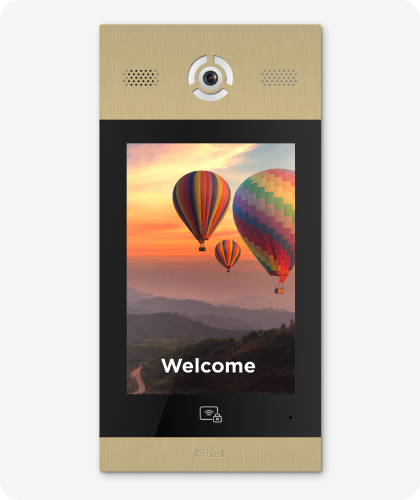
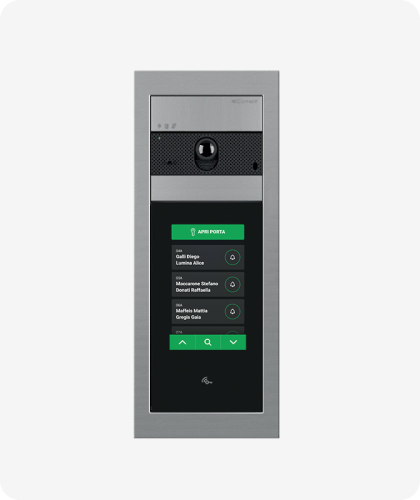
Comelit Intercom System Panel

Comelit VIP vs BAS-IP Comparison

Feature BAS-IP Comelit
Build-In Camera Yes, HD
Access Control Mifare, BLE, NFC
Keyless Entry
Virtual keys (PIN codes) for visitors
QR codes for visitor access
Multifactor Autentification
Property management software integrations
Measuring Temperature
Cloud-based access management
Indoor Phones
Indoor Monitors 7 models
Android Based Monitors
3rd Party APP Support
Mobile APP
Elevator control
Connected IP Cameras Integration
Yes, HD
MIFARE
3 models
Yes (but very expensive)
Looking for intercom system?
Disclaimer: The current comparison was made on July 8, 2022. The Comparison based on information we have available to us at the time of writing.

*BAS-IP supports Mifare Classic, Plus, Desfire EV1, Ultralight.

similar articles
Articles

The entry panel is the first point of contact between a building and a person. And if this building is municipal, social, medical, or educational, the panel at the entrance must be clear and convenient for everyone: the hard of hearing, the visually impaired, elderly people, visitors unfamiliar with the system. AV-08FBIL was designed precisely […]

Articles

A video intercom monitor is often treated as just a screen on the wall. In reality, it is one of the key parts of the system: it is the device through which the user receives the call, sees the visitor, speaks with them and manages access. What a Video Intercom Monitor Is A video intercom […]

Articles

When the word “SIP” appears in the specifications of an intercom or entry panel, it often sounds like something purely technical. In practice, the meaning is much more practical. SIP is a protocol used to establish communication between devices on a network. Put simply, it helps one system “call” another, establish a connection, and begin […]

Articles

When people first come across the term “IP video intercom,” it often sounds more technical than it really is. In practice, the basic idea is fairly simple. An IP video intercom is an intercom system that works over a network. In other words, communication between the entry panel, the indoor monitor, and other devices is […]

Articles

An entry panel is often treated as just “the button by the door.” In reality, it is one of the key elements of the intercom system. It is the device through which a call begins, audio and video are carried, and, in some cases, access, identification, and different entry scenarios are handled. So it is […]

Articles

Access control and a video intercom are often treated as though they were the same thing, because both are linked to entering a building. But they are not quite the same. A video intercom is primarily about communication with a visitor: the call, the conversation, the image, and the decision to release the door. Access […]

Articles

What PoE Means in Simple Terms PoE stands for Power over Ethernet. Put simply, it means that the same Ethernet cable can carry both data and power. That means that, for some devices, you do not need a separate network connection and a separate power feed. If the equipment supports PoE, one cable may be […]

Articles

Why This Comparison Is Often Presented Too Simplistically When people talk about the difference between an IP and an analog video intercom, the discussion is often reduced to a crude formula: analog is basic and outdated, while IP is automatically modern and better. That is a convenient story if someone only wants to sell IP […]

Articles

Start Not with the Design, but with the Use Scenario The most common mistake is choosing an entry panel without a clear task in mind. A panel for a private house, a block of flats, an office, or a commercial site is not the same thing. First, answer the basic questions: How many users will […]

Articles

What the Difference Actually Is A flush-mounted panel is recessed into the wall or into a prepared niche, so only the front face remains visible from the outside. That makes the installation look neater and more integrated. A surface-mounted panel is fixed on top of the wall. It protrudes further, but it is usually much […]